Running a cut
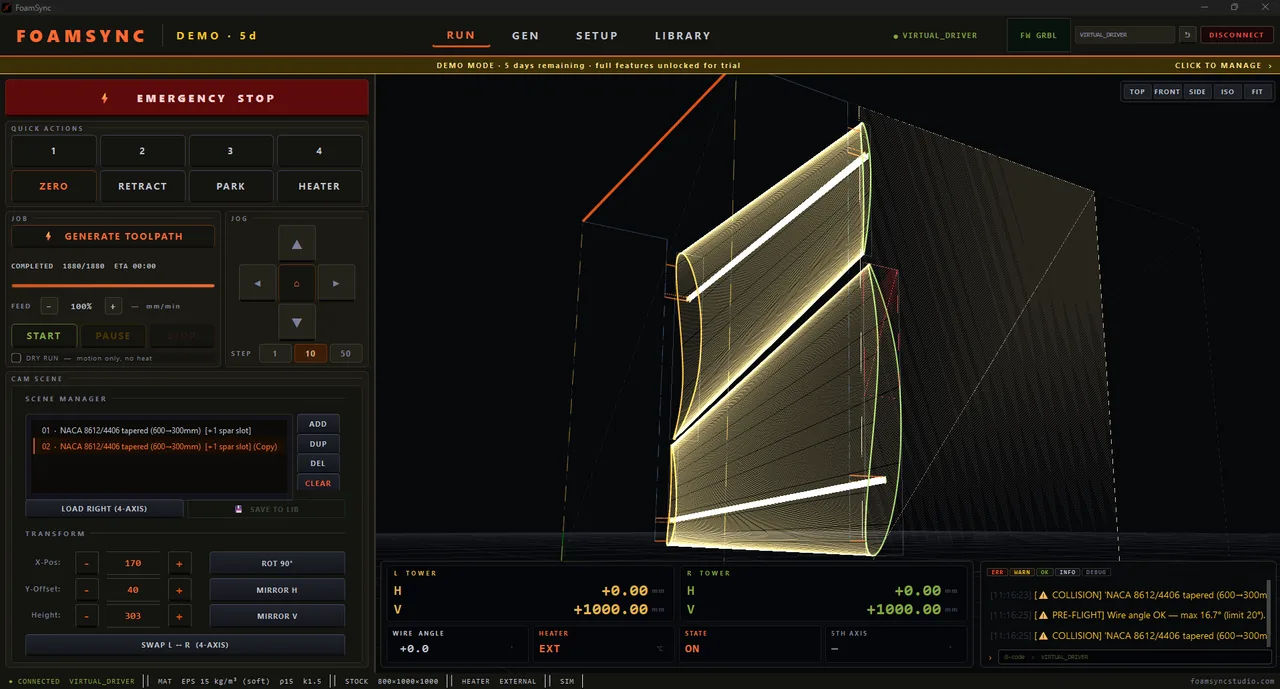
Everything for the actual cut is on the RUN page. Connect your machine first (Connecting) and generate a safe toolpath (CAM).
Before you press START
- Home the machine — establish the reference position.
- Zero the wire — use ZERO (Quick Actions) to set the wire origin from the current position, or jog to your stock corner and zero there.
- DRY RUN — tick DRY RUN (motion only, no heat) and START. The machine traces the full path cold so you can confirm it stays on the stock and clears the towers.
- Heat — bring the wire to temperature for your material (External mode: set it by hand; PWM/PID: FoamSync drives it — see Heater & wire).
Quick Actions
- ZERO — set wire origin from the current position (one tap).
- RETRACT — back the wire off the part.
- PARK — send the towers to a safe parked position.
- HEATER — toggle / open heat control.
- 1–4 — operator-assignable shortcuts (configure under SET → QUICK ACTIONS).
JOG
Move the machine by hand with the JOG pad: the arrow keys drive the selected tower/axes, ⌂ homes, and STEP (1 / 10 / 50 mm) sets how far each press moves. Use jog to position stock, test clearance, and recover after a stop.
Start, pause, stop
- START — begin the cut. If the JOB banner said ⚠ DANGER — PRESS START TO REVIEW, START first opens the review so you confirm the flagged path.
- PAUSE — hold motion (and heat handling) mid-cut; resume from where you stopped.
- STOP — end the job. The wire retracts per your logic mode.
- FEED % — override feed rate live (e.g. slow to 50 % through a tricky section) without regenerating. It scales on top of the path’s feed, which already uses your per-material calibrated feed and eases through tight corners automatically (see Calibration → cut quality).
EMERGENCY STOP
The big red EMERGENCY STOP bar halts everything immediately. Use it for any unexpected behaviour — a bowing wire, a collision, smoke. After an e-stop, re-home before continuing.
Reading the DRO & HUD
The bottom DRO row shows live machine state:
- L TOWER and R TOWER — each tower’s H (horizontal) and V (vertical) position in mm.
- WIRE ANGLE — live lean of the wire; watch this against your max-angle limit.
- HEATER — current heat mode / state.
- STATE —
ON/READY/RUN/ALARMfrom the controller. - 5TH AXIS — rotary position, if enabled.
The log panel (bottom-right) streams every action with timestamps and severity (ERR / WARN / OK / INFO / DEBUG) — your first place to look if something stops.
What’s next
Cut not coming out right, or the machine won’t behave? See Troubleshooting.